AI Chat View
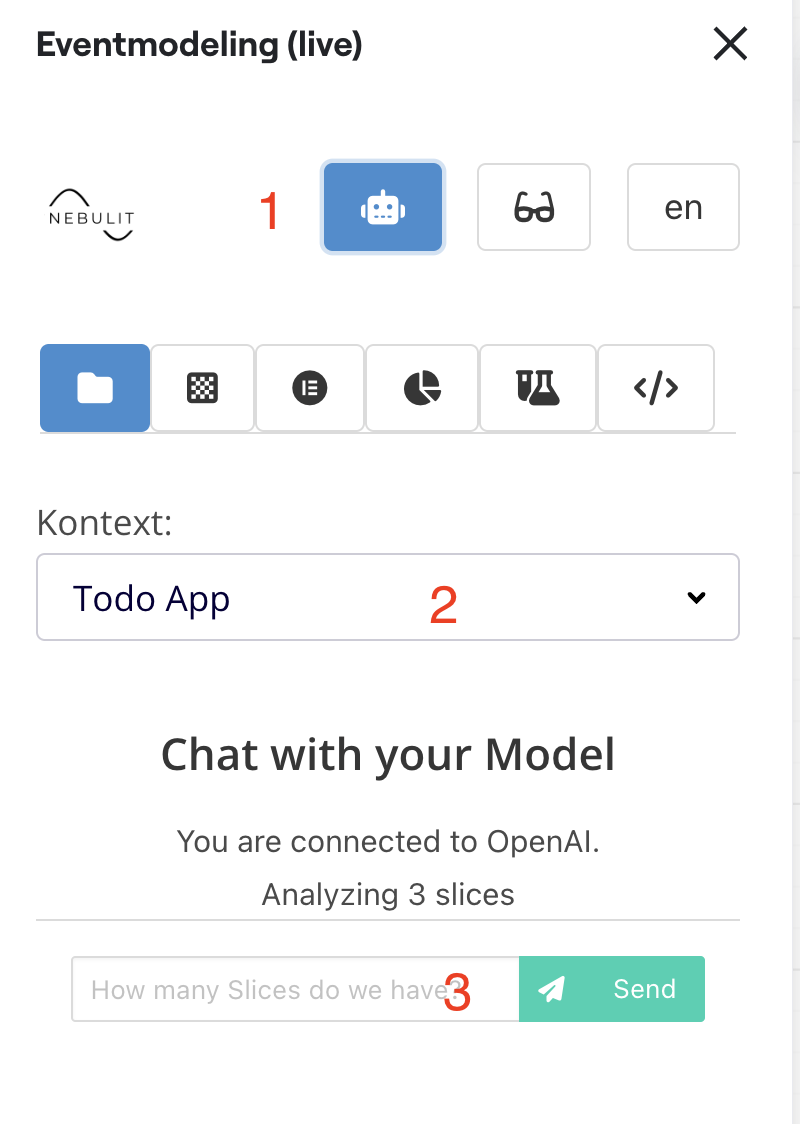
Chat with your Model using AI. For this to work, your model needs to be “sliced”, and the slices need to be assigned to a context.
Prerequisites
Before you can chat with your model, ensure:
- AI is configured - Set up your AI tokens in AI Configuration
- Model is sliced - Your event model should be organized into slices
- Slices are assigned to contexts - Each slice should belong to a bounded context
Using the AI Chat
1) Switch to AI Model
Click the AI View tab or enable AI mode in the toolbar. This activates the chat interface.
2) Select Your Context
Choose which context you want to chat about:
- Select from your defined bounded contexts
- The AI will focus on the selected context’s events, commands, and views
- You can switch contexts during your session
3) Start Chatting
Begin asking questions about your model. Examples:
Understanding Flows:
"Explain the order processing flow"
"What happens when a user registers?"
"Walk me through the checkout process"
Finding Issues:
"Are there any missing events in the registration flow?"
"What edge cases am I not handling?"
"Review my payment flow for security issues"
Getting Suggestions:
"What attributes should the OrderPlaced event have?"
"Suggest events for a refund process"
"How should I model subscription upgrades?"
Code Generation:
"Generate TypeScript code for the User aggregate"
"Create a REST API spec for these commands"
"Show me test cases for the payment flow"
Current Limitations
Context Preservation
Currently, context is not preserved between messages. Each question is treated independently. For related questions, include context in each message:
Instead of:
User: "What events does PlaceOrder trigger?"
AI: [lists events]
User: "What about the first one?"  ❌ Context lost
Do this:
User: "What events does PlaceOrder trigger?"
AI: [lists events]
User: "What attributes does the OrderPlaced event have?"  ✅ Explicit
Example Conversations
Exploring a Flow
You: "Explain the user registration flow in this context"

AI: Your registration flow has these components:

Commands:
- RegisterUser (email, password, name)

Events:
- UserRegistered (userId, email, name, registeredAt)
- WelcomeEmailSent (userId, emailAddress)

Views:
- User Profile (displays user information)
- Active Users List (shows all registered users)

The flow:
1. User submits registration form
2. RegisterUser command is triggered
3. System validates email/password
4. UserRegistered event is published
5. User Profile view is updated
6. WelcomeEmailSent event triggers email

Missing considerations:
- Email verification
- Duplicate email handling
- Password strength requirements
Getting Implementation Advice
You: "Should I use a saga or choreography for order processing?"

AI: For your order context, I recommend:

Use Saga (Orchestration) for:
- Order placement critical path
- Ensures: inventory check → payment → confirmation
- Provides rollback if any step fails

Use Choreography (Event-driven) for:
- Post-order notifications
- Loyalty points updates
- Warehouse notifications

This hybrid approach ensures transactional consistency
for critical operations while keeping supporting services
loosely coupled.
Finding Problems
You: "Review this checkout flow for issues"

AI: I found these concerns:

⚠️ Race Condition:
- InventoryReserved and PaymentProcessed can happen in parallel
- Risk: Payment succeeds but inventory is unavailable
- Fix: Process sequentially or use distributed transaction

⚠️ Missing Timeout:
- No timeout on PaymentRequested
- Risk: Reserved inventory locked indefinitely
- Fix: Add PaymentTimeout event with inventory release

✅ Good Practices:
- Idempotent command handling
- Proper event sourcing
- Clear aggregate boundaries
Tips for Effective Chat
Be Specific
Vague: “Is this good?” Better: “Review my user registration flow for security issues”
Provide Context
Basic: “How do I handle errors?” Better: “How should I handle payment failures in the checkout flow?”
Ask Follow-ups
Build on previous answers by rephrasing with full context:
- “What’s the order placement flow?”
- “What error handling should the order placement flow include?”
- “Generate error handling code for order placement”
Request Examples
"Show me example JSON for the UserRegistered event"
"Give me sample test data for registration"
"What would the API request look like?"
Use Cases
Learning Event Modeling
- “Explain what an aggregate is in this context”
- “Why are commands and events separated?”
- “What’s the difference between a view and a projection?”
Code Reviews
- “Review this event model for best practices”
- “Are my event names following conventions?”
- “Check for missing error handling”
Refactoring
- “Should I split this aggregate?”
- “How do I reduce coupling between contexts?”
- “Suggest a better way to model this workflow”
Documentation
- “Explain this model to a new developer”
- “Create user documentation for the checkout flow”
- “Generate API documentation for these commands”
Privacy and Security
What the AI Sees
- Event, command, and view names in the selected context
- Attributes and relationships
- Flow connections
- Board structure
What the AI Doesn’t See
- Other contexts (unless selected)
- Personal information outside the model
- Other boards or workspaces
- Your API tokens (stored securely)
Data Handling
- Queries are processed in real-time
- Not permanently stored
- Encrypted in transit (TLS)
- Compliant with provider privacy policies
Troubleshooting
“No Context Selected”
- Make sure you’ve created at least one context
- Select the context from the dropdown
“Model Not Sliced”
- Your model needs to be organized into slices
- See Modeling Slices
“AI Not Responding”
- Check your AI configuration in AI Configuration
- Verify your API token is valid
- Check internet connection
Poor Quality Answers
- Ensure your model is well-structured
- Use clear, descriptive names for events and commands
- Provide more context in your questions
- Try rephrasing the question
Next Steps
- AI Configuration - Configure your AI settings
- Chatting with Your Model - Comprehensive AI chat guide
- Generating Specs - Create specifications with AI
- Modeling with AI - Build slices using AI